
How many customers gave up and called a competitor because no one answered?
Lift your income without working longer hours.
Try it free for 14 days. No obligation.
When you’re busy, unavailable or closed, ClientLine answers your calls and messages, captures what customers need and sends the details to you.
Appointments. Product questions. Service enquiries. Customer support.

Start 14 days free
Three quick details and we’ll call you to set up. No card needed.
Sound familiar?
- How much revenue is slipping away after hours when your phone goes unanswered?
- How many new leads are you missing while your team is busy with existing customers?
- How many appointments were never booked because callers reached voicemail?
- Is your voicemail quietly sending customers to your competitors?
- How much time does your team waste returning calls from people who have already moved on?
- Are you losing sales simply because nobody is available to answer the phone?
ClientLine answers every call and chat, day and night, and sends you the enquiry.
Start my free 14 daysBusinesses ClientLine serves

Practices & professionals
Doctors, optometrists, dentists, psychologists, physios and vets
Help patients reach your practice while you focus on the person in front of you.

Appointment & service businesses
Salons, spas, mechanics, plumbers and electricians
Capture booking requests and job details while you work.

Product businesses & shops
Retailers, online shops and product suppliers
Answer product questions and capture sales and support enquiries.
Photos: Pavel Danilyuk, Sergey Meshkov, Vitaly Gariev (Pexels)
📞 Answer
Every call and website chat, day and night, from your own business information.
📝 Capture
Name, number, email and what they need: a booking request, a product question, a job or a support issue.
✅ Follow through
You get the details straight away, confirm bookings, reply, and see every customer in one place.
From first question to ongoing support
- 1. Customers ask their way. They call your number or chat on your website or a link you share. Your receptionist answers from your own information. Booking requests and details are typed into a short SMS form, so names and numbers are not misheard.
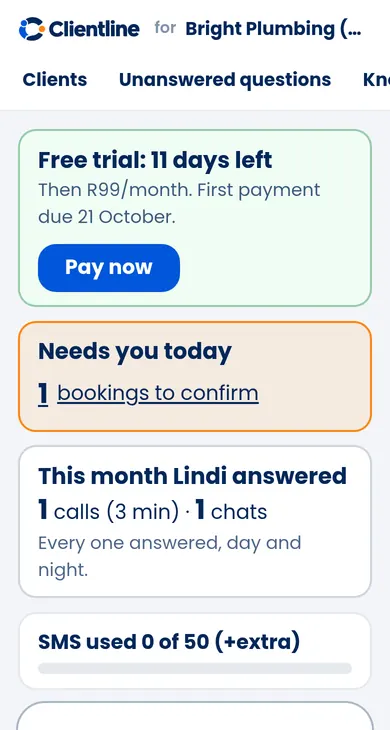
- 2. It reaches you. You get an email after each call or chat that needs you, with a short summary. Your dashboard shows what needs you today: booking requests to confirm, questions it could not answer and customers who want a person.
- 3. You take over. Confirm or decline booking requests, reply in the chat yourself, call the customer back, or teach it a new answer. The customer gets your confirmation by email.
Hear how ClientLine could answer for your business
Call 060 017 3346. Ask about opening hours, a service or an appointment.
📞 Call 060 017 3346Getting started
- 1Register (2 minutes)
- 2Give us your business info
- 3Test your receptionist
- 4Go live
Plans
Phone
R990 /month
Your own number answered day and night, website chat included. 300 minutes of calls and 50 SMS a month included, reasonable use.
Phone + chat
R1,089 /month
Phone and Chat as two plans, so your website chat keeps working even if you stop the phone line.
Chat
R99 /month
Website chat and a chat link you can share, answered day and night.
- • Bookings are captured as requests you confirm. Nothing goes in your calendar as confirmed until you say so.
- • 14 days free, starting when we set you up. No setup fee.
- • No card or payment details at sign-up. Your 14 days start when we set you up. When they end, you get an invoice by email with a Pay now button (secure card payment by Yoco). Nothing is charged automatically, so you can stop any time by not paying or by telling us.
Questions
Can I keep my own number?
Yes. Keep your number and forward it to your ClientLine number (most phones and networks let you forward when you are busy, do not answer or always). Your customers still dial the number they know.
Can I step in?
Yes. You see every chat and call in your dashboard, and you can reply in any chat yourself. Customers can also ask to talk to a person, and you get an alert.
What if it can't answer?
It never makes things up. It takes the customer's details and the question, tells them you will come back to them, and sends it to you. You answer once and it learns the answer for next time.
Where do I see customer details?
In your dashboard: every customer with their name, number, email, what they asked, their chats and calls, and their booking requests.
How is data protected?
Your customers' details are used only for your business, stored securely, and only you and the ClientLine team can see them. We follow POPIA: you can ask us to see or delete data at any time.
When do I pay, and how do I cancel?
No card or payment details at sign-up. Your 14 days start when we set you up. When they end, you get an invoice by email with a Pay now button (secure card payment by Yoco). Nothing is charged automatically, so you can stop any time by not paying or by telling us.
You run your business. We catch the enquiries.
Start 14 days free. No card needed. Questions? Call 060 017 3346
Chatted with a business before? Open my chats